Showing posts with label #DSDN142. Show all posts

Thursday, 7 June 2012

Creative Coding, Project Three, Blog Eleven

Finished!

I have now completed my code ready for hand-in.

Here's the link for it on open processing...
http://www.openprocessing.org/sketch/63605

Since last time I have further developed the freezing idea and now when the mouse is held over a snowflake it will grow and form an ice cube shape, additionally I have made the snowflakes semi-transparent so they look more icy. If the ice cubes are then left unattended they melt back down and begin to spin.
Here's some ice cubes
Here's some more
I also decided to have the snowflakes freeze quicker when the mouse is near to create the idea it is freezing them and also it makes it more satisfying in my opinion.

At one stage when working on these developments I ended up putting a '{' in the wrong place and the whole application ended up going pretty crazy...Check it out...
http://www.openprocessing.org/sketch/63599

As a summary I will answer the questions we were given at the beginning of the project...

Why is it fun?
You are able to interact with the Snowflakes motion, size colour etc + when you don't interact they still do stuff on their own accord (they have a life of their own).
What does the person learn over time?
They learn that the Snowflakes spin and explode of they are not interacted with, and that they can transform if intreated with.
How long does it take to learn?
A little while, the person has to have a turn at interacting and not interacting to see exactly what the application does.
Is it still fun once you've learnt?
Yes, once you have learnt the interaction becomes more interesting as you can see the effect it has on the Snowflakes which is the fun part.
How is it similar/dissimilar to a game?
It's dissimilar from a game in the fact that you don't really achieve something from playing with it, their is no goal to reach, in a way you could try turn it into a game by trying to keep the Snowflakes from exploding, but there is no real consequence is you don't, you can't win or lose. Instead you simply interact with overheating Snowflakes.

Wednesday, 6 June 2012

Creative Coding, Project Three, Blog Ten

Since my last developments I have been experimenting with snowflakes exploding. I first made it so they explode once they have reached a certain speed by having the distance between the shapes constantly increasing.

However I wanted to add a few more features to it, such as what I had previously, being the trembling of the snowflakes just before they explode.

So I tried doing this again, however since the snowflakes were already rotating, it added the increase of the x and y co-ordinates which creates the shape form the central point however it still rotated around the original point meaning the orbited around a point they didn't spin around the central snowflake position.

This is what is happening in the image below.
Crazy rotations!
In the next image below shows the same thing except quite are few are exploding...

In order to fix this (or more make it less crazy) I simply reduced the amount it could shake by, so now this still happens but it is so small it just creates they amount of shakage I want but does not make a mess.

Here are the remaining snowflakes that haven't exploded and now their rotation point is not distorted.
I then looked at adding another feature to the explosion, having the shape size increase just as they're about to explode. I think this enhances the exploding idea, as quite often when things inflate too much they explode, thus the growing complements the action.
Here I have the shape size grow just before they explode.
I also made it so if the mouse runs back over an inflated snow flake the size will decrease back down to original size to show it has been reversed, I also wanted to have a reversal not just a snap back to the original size so it is more fluid.
Here some of the inflated snowflakes have exploded.

After creating the explosions I then looked at bringing colour back to my application. I first looked at the background colour, having it fade into different shades in relation to the mouse speed. I learnt a new function which is used for fading colours from one to the other called 'lerpColor'.
Here is an example from my code of using lerpColor, I have two colors 'col1' and 'col2' then another variable 'speed[i]' which holds the value in how much of each colour it will use, thus if it changes the colour will change/fade.
However for my background exploration I ended up making it so the background colour faded to a colour dependent on where it was on the screen, I had the colours fading between white and red but ended up with some odd colours in between as you can see by the following images...
Orange

Grey

Purply Grey
I then decided my background colour did not need to change in order to enhance the interaction so I decided to have it as a dark blue to complement the white colour of my snowflakes and give the idea of 'cold' as it is when you have snowflakes.

For my snowflakes colour I decided to have them white while they are still but then when they rotate the begin to fade into red, so the faster they got the reder they get until they explode. I thought red was suitable with my concept as it represents heat as opposed to a cool blue or white.
Here are my snowflakes glowing red before they explode.
A handy tool I discovered that Processing has is the Color Selector, which is useful to find out the values of the colours...
Color Selector
Another feature I wanted to add was to have the snowflakes respawn after they explode, so the application never ends. I did this by having it that after a certain amount of time they reappear, I then added it so they fade back in. I also made it so that in the beginning the snowflakes slowly fade in before they start.
Here the snowflakes are fading back in after previously exploding.

Again more snowflakes respawning
After doing all of this I looked at my application to see if I found it fun. I decided that since I had inverted it seemed less fun as by interacting with it the snowflakes stop and the action freezes, watching the snowflakes explode on their own accord seemed much more fun that bothering to interact.

So I have since been looking at ways to make the interaction more worthwhile. I have been looking at having a second layer of shapes appear in the snowflake when the mouse is in range.

In the image below I had just added the extra layer to all snowflakes no matter what range they were from the mouse, I made them a yellow colour...
I then looked at making it so they pulse inside the snowflake but only when the snowflake is stationary otherwise it fades away. In terms of the colour I made it fade between red and white, white when it is most spread and red when it is compressed in the centre. I also learnt a new feature which makes pulsing movements much easier, the function 'sin' or 'cos' which puts the increasing value into a sin or cos wave so it instead alternates between -1 and 1. This was the result....
Pulsing inner layers.
I then decided shades of red were not the right colour as in this case red is heat and when the snowflake is stationary it should be cool, so I instead made the colour a light blue.
Light blue inner layer
I still thought that even with this it wasn't that interesting so I decided to make it that each snowflake has it's own individual shade of blue inner pulsing layer...
However after experimenting with this I found it was not that interesting. So I then looked at having the inner layers beat faster when the mouse was near, at first I made it a little too fast but now I have it as a speed I like and I think I will keep this.

I have now re-looked into my idea of them being snowflakes and this whole heating and cooling idea and have decided that the mouse could take the role of a freezer, when it runs over the snowflakes it freezes them restoring them to white and freezing them still, and now additionally I want them to freeze further into an ice-cube, meaning the shape size will grow until it is completely inflated into a cube. Additionally the pulsing inner layer has become a snowflake heart, which looks as if it pumps it up, you really have to play with the application to get what I mean. However I want to have it so once the mouse moves away it melts back to its original sizes then spins turning red and explodes.
Here's what I have accomplished based on this ides so far.
I am now going to further this develop idea more and also look at having the snowflakes transparent as it looks more awesome.

Thursday, 31 May 2012

Creative Coding, Project Three, Blog Nine

After getting to the stage I was at last time I have since reviewed that and looked at seeing if I could refine that into a single/main interaction. It became apparent that perhaps being able to 'collect' the snowflakes onto the mouse position wasn't particularly relevant to the main interaction, so for now I have cut this out.

This is the result of being able to remove snowflakes, I have since removed this feature.
I have also decided to 'invert' my interaction idea, so instead of using the mouse to increase the spinning speed it will instead decrease the speed, while if you leave them unattended they will increase in speed then shake then explode unless attended to.

So far I have the snowflakes becoming faster and faster when unattended then once the mouse is within range their speed dampens down until it has completely stopped.

I am now going to reintroduce the shaking and explosions, then I will look at introducing colour.

Here's the link to my current progress...
http://www.openprocessing.org/sketch/63598

Tuesday, 29 May 2012

Creative Coding, Project Three, Blog Eight

After not having a lot of ideas of how to progress my application further I decided to have another brainstorm, which this time was successful and gave me somethings to achieve, I found going back to the application progress I showed during the interim presentation useful to remember what was fun about it, so I could reintroduce it to my current progress.

I previously had it that when the snowflakes are within a certain range of the mouse they disappear, I decided to change this so that when within this certain range instead of this I have it so they spin, while the other snowflakes remain stationary. I also further added to this by having it so the spinning snowflakes  shapes spread out also as seen in the image below...
However I didn't like it how once a snowflake was out of the mouse area it just stopped rotating instantly reseting to the default position as seen in the above image. Instead I wanted it so that as they move out of the mouse area their rotational velocity eases down to zero. To fix this problem required the use of more arrays as I needed each snowflake to have its own set of rotational data as well as velocity data. So I created an array for both of these variables with a capacity of 100 as there are 100 snowflakes. I then made it so the snowflakes are always able to rotate however they only speed up when they are in the mouse area otherwise they slow down and eventually stop. 
Here are my array set up variables with the 100 capacity.
This is the result of using the arrays for individual snowflake rotation values.
I then looked at continuing to play with the spec between the shapes for each snowflake and thought it could be interesting that instead of having the this space go back to the original space gap once the mouse moves away from a particular snowflake, to have it stay the same instead, this was the result...
This was pretty fun to play with in terms of the way the shapes interacted with the mouse movement, it's hard to explain but it was quite cool....Here's the link....
http://www.openprocessing.org/sketch/63596
However it didn't lend much opportunity for the direction I was heading in so I removed the function of the shape space increasing when the mouse comes near. I instead looked at having explosions again like I had before. I currently have it so that now if the mouse does not come close enough to a snowflake for long enough it will begin to wobble, if it is still not attended to it will then explode, meaning the shape space will increase rapidly until the shapes of the snowflake are no longer visible on screen. This feature is working awesomely, the screen shot below shows a few snowflakes exploding...
Doing this meant creating more arrays, as I needed separate wobble values and other data for each of the 100 snowflakes to make this possible.

I then added another feature to add even more fun interaction. This time I thought it would be cool that if the mouse position was in a close enough proximity to a snowflake for a long enough time at a fast enough speed the snowflakes x,y position would change to the mouse x,y position. I managed to pull this off as you can see in the image below...
I think this is a really fun little interactive feature which I will definitely keep and perhaps develop on. I think what makes it successful is that it is quite hard to do interns of the interaction not the coding.
I have now also looked at making the shapes of the snowflakes grow as the mouse passes over them, as seen in the image below...
I think this is a fun interactive feature as it brings more diversity to the overall image, however it didn't work so well when the shape size kept infinitely increasing, so I put a cap on how much it could grow...
As you can see above the shapes cannot go past that size, also when the mouse moves away from them they shrink back down to the original size.

So this is where I am currently at, I think I will continue to further develop these features, then I will look at polishing up the applications appearance.

Friday, 25 May 2012

Creative Coding, Project Three, Blog Seven

After presenting my application as it was I have since stripped it back in order to rework it and improve it so it is even more fun and interactive.

I decided to strip it back so it was easier to work with and so I can navigate my way through my code easier when adding more interactive functions. In terms of what I stripped back, I have removed the different 'levels' and colours that went with that. This made my application look like this...
Stripped back version of my application.
Here is the stripped back version...
http://www.openprocessing.org/sketch/63594
I also had a go at stripping away the background as well which created a pretty cool effect, creating the ability to create some cool looking patterns...
One of the cool looking patterns I was able to create.

                                     
Another cool looking pattern
I could possibly have this as a feature in my application as it is quite a fun interaction to play with.

I then reapplied the background and tried some other types of interactions...

I looked at having the layers of shapes separate along the x-axis as the cursor speed increased, this was the result...
I don't think this was particularly successful, it's not greatly fun or awesome.

I then experimented with decreasing the size of the shapes, increasing the size of the snowflake and decreasing the number of snowflakes, I then added a flashing effect to them so the overlapping shapes spread out quickly then go back to being stacked on top of each other...
...As seen here...
This created quite a cool effect however it was quite rough on the eyes, however it could be a cool effect that results from interaction.

In order to make each shape layer stagger as the flash out, I attempted to use an array...
 In the end I found that I couldn't make the array work particularly efficiently as I still had to write out each different value (diffgap[0], diffgap[1]...etc...) and in the end I couldn't get it to work. However since then I have learnt how to make it efficient by using a loop to create the different values using a variable to replace the number in the brackets (diffgap[variable]) and just increasing by a given increment using the loop.

I also looked at decreasing the size and increasing the number of snowflakes...
I further added to this by making it that wherever the mouse position is any snowflake within a given radius disappears as shown in the images below...

I think this feature is quite interactive and with a bit more to it it could be pretty fun too so I think I will keep experimenting with it.

I have also had another look at some applications on open processing and found this one....


This starts the way it is on the left, then when you press a letter on the keyboard it forms into that letter. I think this could be a cool idea, maybe in mine if the mouse is clicked the snowflakes could combine together to make different formations.

Thursday, 17 May 2012

Creative Coding, Project Three, Blog Six

I have now made my application even more interactive, I also altered the colours a little but too.

Now when you hold down the mouse clicker the 'snowflakes'(which don't really look like snowflakes anymore) begin to shake and expand in size, then once the mouse is released the shaking stops however the shape size remains and is only reset if the flashing red screen is reached and it is clicked and reset.

I've also now made that even if there is no cursor speed the shapes will remain on the screen, this way you can create patterns with the rotating shapes and view them and also take screen shots. Here are some of mine...

Here is a picture of the original code without any interaction.


This is the second screen after vigorous mouse movement.


This is the third after even more mouse movement.
And this is the final screen, if the mouse is moved too fast after this one it goes to a flashing red screen.
Here is a shot of the first screen with the mouse pressed down, as you can see the shapes have moved out of place and have grown.
Overall I think this has made the application more fun as there are now even more elements to it.

Here is it so far...
http://www.openprocessing.org/sketch/63597

Wednesday, 16 May 2012

Creative Coding, Project Three, Blog Five

(I appologise for any random formatting in this post it is not what I intended 'Blogger' has a mind of its own)

I've decided to now do a bit more research into other interactive applications to see what I can take from them to further improve my application.

I started with the 'sea monkey' application, a previous first year students work.

Why is it fun?
Because the sea monkeys interact with the cursor when it moves they also move in an organic way.
What does the person learn over time?
They learn that the 'sea monkeys' will not react if the cursor does not move.
How long does it take to learn?
Not very long.
Is it still fun once you’ve learnt it?
A little bit, it is fun dictating the direction of the swarm movement and seeing them move organically as they do this.
How is it similar/dissimilar to a game?
This is fairly dissimilar to a game as it does not reward you with any achievement, there are not levels etc. You do not gain anything.

I then looked at another previous students work, this is one I have looked at a lot over the process so far.

Why is it fun?As by interacting with it you gain more from it.
What does the person learn over time?That the fatter they click the more the picture changes, and if they don't click fast enough what they have achieved is reversed.
How long does it take to learn?A little while.
Is it still fun once you’ve learnt it?Yes, it is still fun as you can try get further and further through, however once you get as far as possible a lot of the fun has gone.
How is it similar/dissimilar to a game?This is fairly similar to a game as it rewards you the further you interact with it.

I also looked at this application I found on open processing, which every time you click it alters the shapes slightly, and uniquely every time.

Why is it fun?Well it isn't really that fun, but the thing that makes it a little bit fun is how the shapes continuously evolve into something new and different each time, however the evolution isn't that significant.
What does the person learn over time?You learn that with each click the shapes change.
How long does it take to learn?A very very short amount of time.
Is it still fun once you've learnt?The fun of this game doesn't really come from learning you must click it comes from the randomness of the result of the click. I away you can never learn exactly what is going to happen next but you have a rough idea, and when you get that rough idea of how much the shapes will evolve it isn't that fun.
How similar/dissimilar to a game is it?Not very similar at all, there isn't any 'skill' factor involved.

Another application I found on open processing was one with a lot of 'crazy squares'. It involves a whole lot of squares moving fast around the screen and if you manage to click on one it changes colour.

Why is it fun?It provides a challenge, it gives you the incentive to try turn all the squares purple, but it makes it hard to do, so if you were to achieve it there would be a sense of achievement.
What does the person learn over time?You learn that by clicking squares they turn purple.
How long does it take to learn this?Well that depends, someone may never learn this, it doesn't necessarily tell you or give you a hint to click the squares other than the fact they are moving.
Is it still fun once you've learnt this?Once you learn it it the creates the incentive to achieve something, so yes.
How is it similar/dissimilar to a game?It is similar to a game as there is something to achieve I guess (turn all the squares purple) however there isn't really any reward for it.

So taking in from what I've learnt from these and reflecting on my project I think I am on the right track in rewarding users for interacting with it by having it change, however I think there is a level of interactivity that is missing from it. I would like to now look at creating some random organic movement for each of my 'snowflakes' so perhaps they move around the screen a little, or they sway in one spot.

Tuesday, 15 May 2012

Creative Coding, Project Three, Blog Four

After completing my snowflake and making it explode I tried position multiple copies of it on the screen.
Here's one of my attempts...
http://www.openprocessing.org/sketch/63595
However with my code the way it was this proved difficult. I did learn some new things though in trying to do this. Such as using the brackets on voids to store variables, this came in handy when duplicating snowflakes as I could individually change each ones co-ordinates. I also learnt about the function pushMatrix and popMatrix which saves the previous co-ordinate positions (push) then reapplies them (pop). This was useful in combination with the rotate function as without it as I duplicated each snowflake it would apply the rotation around the previous snowflake, whilst with popMatrix it reapplied the previous co-ordinates so it spun in relation to its self.

However in the end I decided to redo my code as the way I had it was limiting and confused. So taking what I had learnt I rewrote it.

This is what I started with keeping it very simple, testing the latest thing I learnt putting variables in the brackets by the void...
New Beginning
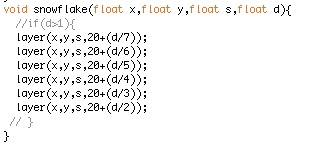
I also decided to change my snowflakes a little as well, they don't quite look as snowflake like anymore. I decided to have all the layers on at once however all stacked behind each other, unless the speed of the cursor(d) increases, when this happens the distance between them increases with the furtherest layer moving the greatest distance as a result.
Layer Setup
 After completing my snowflake setup I created a double 'for' loop to make the snowflake repeat along the y and x axis.
my for loop code.
 In doing this, this is what I ended up with...
'snowflakes' positioned along the screen
Now when the speed of the cursor increases the layers of shapes spread out. I also made them rotate to the cursor speed as well, meaning the faster the cursor goes the faster they spin.

In order to make it more fun and even more interacted I decided that if the cursor speed exceeds a given speed over a given time the background changes colour and the distance of the shapes from the centre point of the snowflake and between layers increases, this creates a different looking movement between the snowflakes. I have that this can happen twice, so I have three different levels, blue, green, and red, however if red is exceeded it 'explodes' ( the distance between layers continuously increases until all shapes are off the screen) and the screen flashes shades of red, but if you click it resets back to blue.

Another thing I made to encourage vigorous interaction with my application is if a new level is reached and the cursor speed drops below a certain speed for a given time it will default back to the blue level. I think this makes it more fun as you are rewarded for interacting while if you don't interact enough you are 'punished' in a way.